Integrating 1Kosmos as a Service Provider in Okta Catalog
This topic outlines the steps to integrate 1Kosmos with the Okta catalog.
Supported Features
The Okta SAML integration currently supports the SP-initiated SSO feature.
Configuration Steps
- Sign in to your Okta instance as an administrator.
- Navigate to Applications > Applications > Browser App Catalog.
- On the Browse App Integration Catalog page, select the 1Kosmos application and click Add Integration.
- On the General Settings: Required page, enter the application name, Entity ID, and ACS URL.
- Copy the Entity ID and ACS URL from your 1Kosmos instance under the External IdP Config section and paste them into the corresponding fields under General settings: Required page of the Okta instance.
When adding the ACS URL, it is recommended to remove the https:// prefix.
-
Click Done.
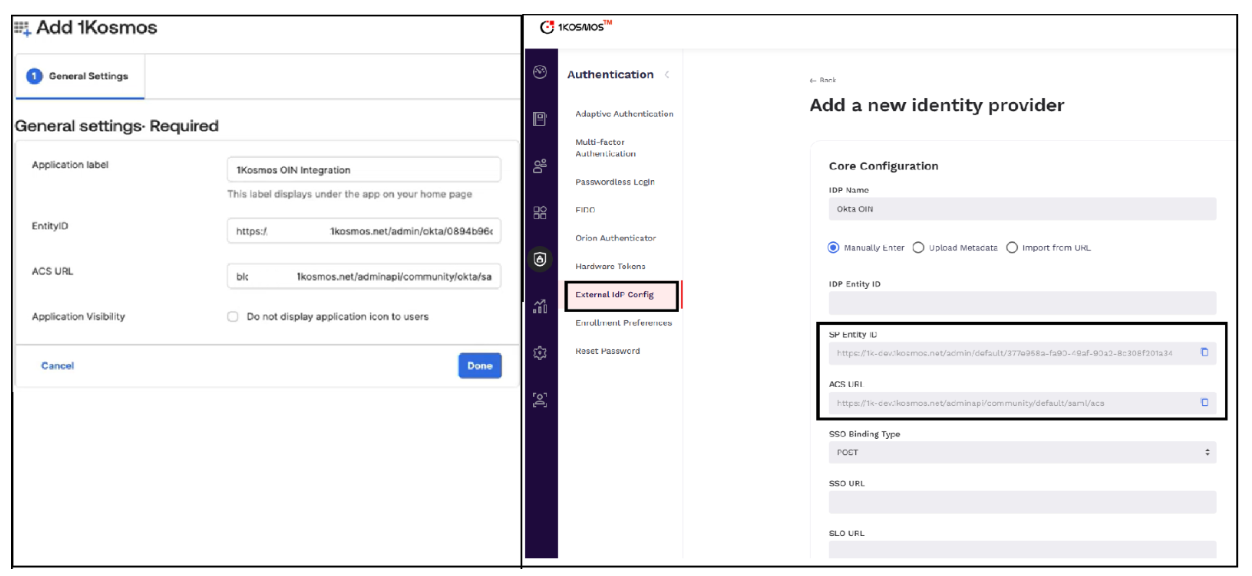
-
In your Okta instance, navigate to the Sign On tab and copy the Metadata URL.
-
In the 1Kosmos interface, paste the Metadata URL into the Enter Metadata URL field and click Import. The Core Configuration tab will auto-populate with the corresponding values.
-
Copy the Sign Out URL from the Okta instance and paste it into the SLO URL field in the 1Kosmos interface.
-
Click Save.
-
In the Routing Policies tab of the 1Kosmos instance, define the condition for users to exclude from the policy, enable the policy, and click Save.
noteBy default, this policy applies to everyone. However, you can exclude certain users from it. Enabling this policy is optional.
Setting Up SP-Initiated Single Sign-On
This section explains how to configure and perform SP-Initiated Single Sign-On (SSO), where the authentication flow is initiated from the Service Provider (SP) rather than the Identity Provider (IdP).
This section applies only to SAML or OIDC integrations that support app-initiated Single Sign-On (SSO), also known as Service Provider (SP) initiated SSO.
The user sign-in flow starts from the 1Kosmos sign-in page. The user enters their username, and 1Kosmos sends the authentication request to Okta (the Identity Provider) to authenticate the user.
The sign-in process is initiated from your 1Kosmos tenant.
- From your browser, navigate to the 1Kosmos tenant sign-in page.
- Enter your username. You will be redirected to the Okta sign in page.
- Enter your Okta credentials and optionally provide your MFA as per your organization’s policies. You will be redirected to 1Kosmos and be logged into the interface.