Event Logs
Overview
The Event Logs dashboard contains detailed data on specific events for your tenant. Events can be filtered by username, event type, and by date.
To access your event logs dashboard, follow these steps:
-
Navigate to your AdminX tenant and log in as a community administrator or help desk admin.
-
Click on the Reports icon, located on the left-hand menu, and select Event Logs.

-
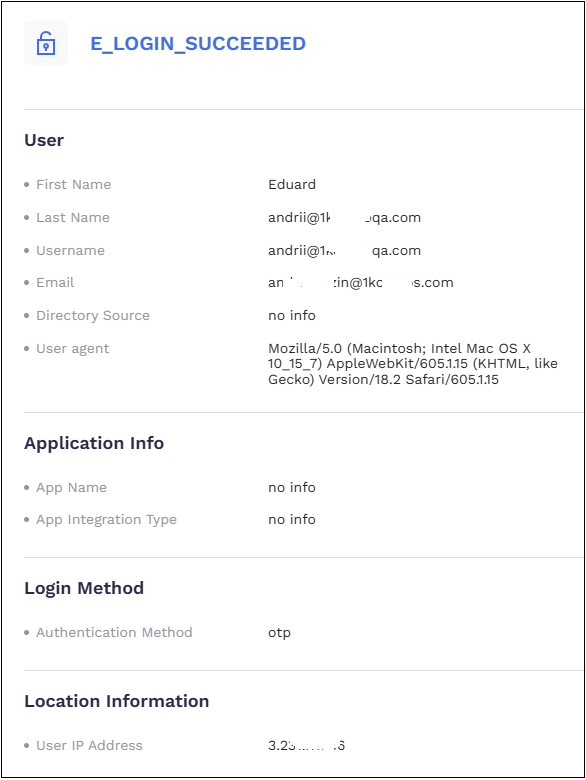
To view information for a specific event, click the event you wish to examine. The details of the event logs page are displayed.
-
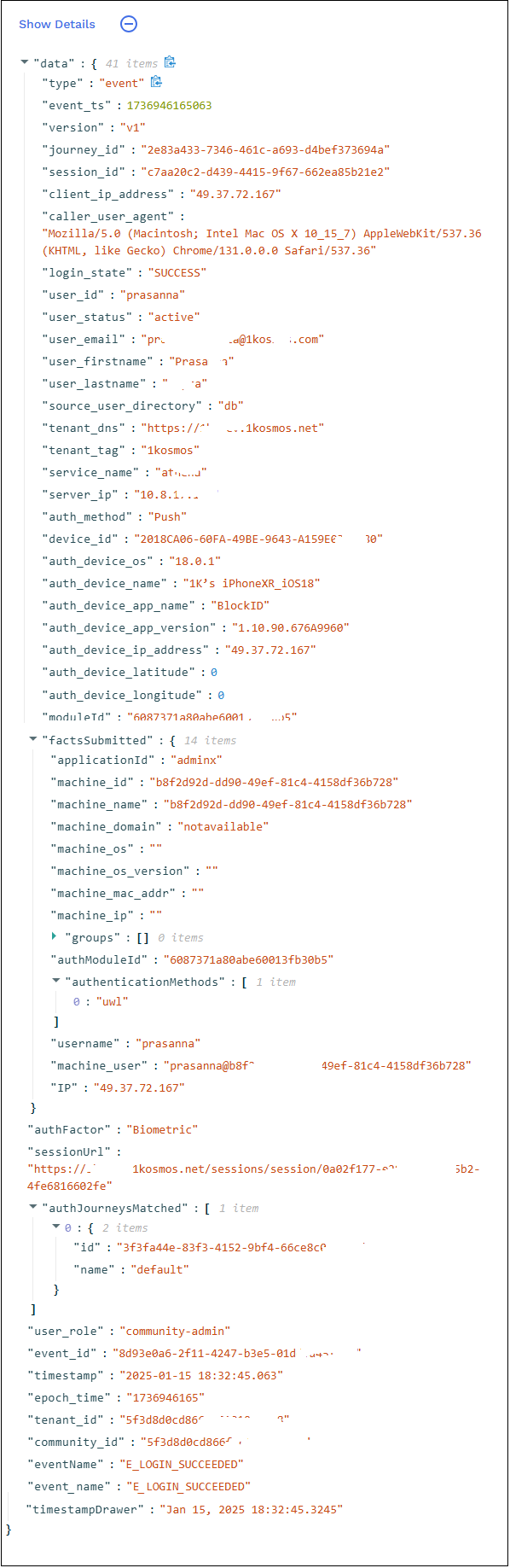
After examining the details, click Show Details to view detailed information regarding the event.
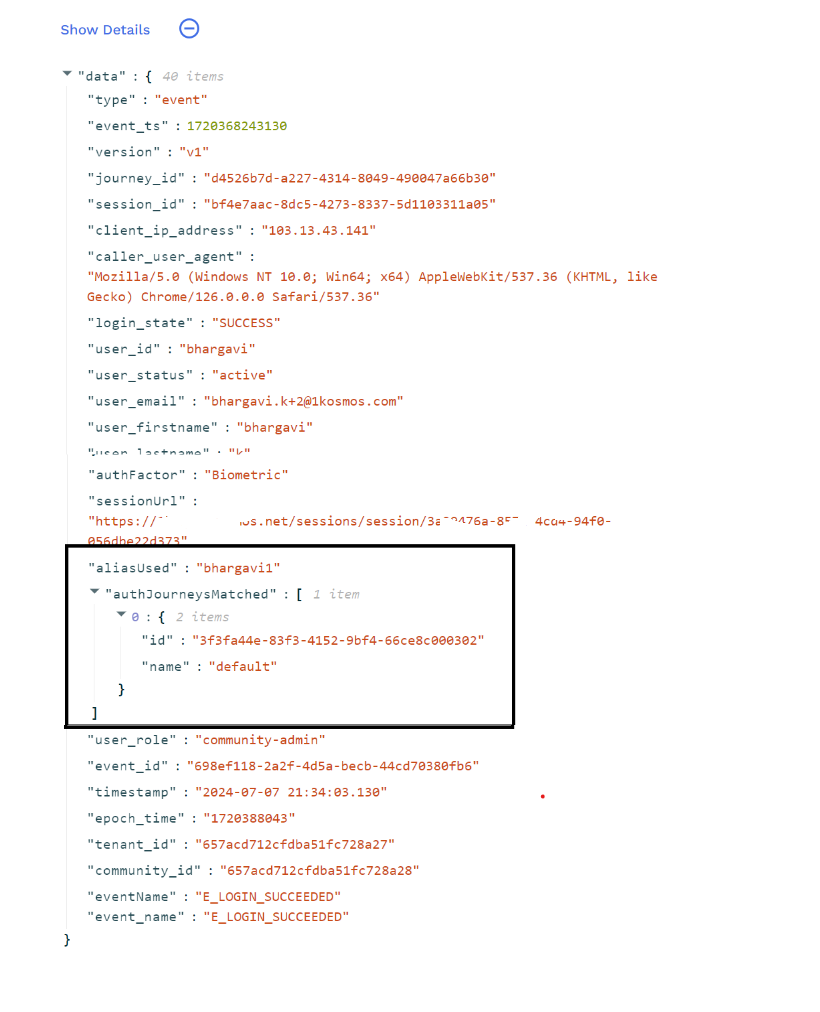
Viewing Aliases Used for Authentication
You can use the Show Details section under Reports > Event Logs dashboard on the AdminX interface to view the details of the aliases used for authentication.
User Activity
All user activity can be tracked and reviewed through event logs. The following event names are used to classify different categories of event data. Tenant details are recorded as part of each event log.
E_LOGIN_SUCCEEDED
The E_LOGIN_SUCCEEDED event is created when a user successfully logs in to their account and records the following account information:
typeevent_tsversionjourney_idsession_idclient_ip_addresscaller_user_agentlogin_stateuser_iduser_statususer_emailuser_firstnameuser_lastnamesource_user_directorytenant_dnstenant_tagservice_nameserver_ipauth_methodauth_device_osauth_device_nameauth_device_app_nameauth_device_app_versionauth_device_latitudeauth_device_longitudemoduleIdotp_typefactsSubmittedapplicationIdmachine_idmachine_namemachine_domainmachine_osmachine_os_versionmachine_mac_addrmachine_ipagent_versiongroupsuserTrustedLocationsauthModuleIdauthenticationMethodsusernamemachine_userIPauthFactorsessionUrlauthJourneysMatchednameIduser_roleevent_id- timestamp`
epoch_timetenant_idcommunity_ideventNameevent_name
E_LOGIN_FAILED
The E_LOGIN_FAILED event is created when a user attempts to log in to their account but fails. It captures user account information and the reason why the login attempt failed.
typeevent_tsversionjourney_idclient_ip_addresscaller_user_agentlogin_stateuser_iduser_statususer_emailuser_firstnameuser_lastnamesource_user_directorytenant_dnstenant_tagservice_nameserver_ipauth_methodauth_device_osauth_device_nameauth_device_app_nameauth_device_app_versionauth_device_latitudeauth_device_longitudemoduleIdotp_typefactsSubmittedapplicationIdmachine_idmachine_namemachine_domainmachine_osmachine_os_versionmachine_mac_addrmachine_ipagent_versioneventDatareasonevent_idtimestampepoch_timetenant_idcommunity_ideventNameevent_name
Onboarding Activity
User onboarding activity can tracked and reviewed in the event logs.
E_USER_INVITED
The E_USER_INVITED event is created when a user is invited to a tenant. The event captures which email address the invitation was sent to and which user account created the invitation.
E_USER_ONBOARDED
The E_USER_ONBOARDED event captures information about the user that was onboarded to the tenant and details about the device the user linked to their account.
Authentication Activity
All user authentication activity is captured and is trackable through event logs.
E_ACCOUNT_LOCKED
The E_ACCOUNT_LOCKED event is created when a user account is locked and therefore unable to login. The log will also record the time the account was locked, and the reason the account was locked.
Note: The E_ACCOUNT_LOCKED event only records account lockouts due to exceeding the maximum number of incorrect OTP attempts.
Event Details Captured
tenant_idcommunity_idusernameinitiatedbylockedAtreasonreasonCodemessage
E_ACCOUNT_UNLOCKED
The E_ACCOUNT_UNLOCKED event is created when a user account is unlocked and account access is restored.
Note: The E_ACCOUNT_UNLOCKED event only records account resoration when the lockout was due to exceeding the maximum number of incorrect OTP attempts.
Event Details Captured
tenant_idcommunity_idusernameinitiatedbylockedAtreasonreasonCodemessage
E_DEVICE_DELINKED
The E_DEVICE_DELINKED event is created when a user removes and delinks a mobile device as an authentication method from their account.
Event Details Captured
tenant_idcommunity_idusernameactorauth_device_application_idauth_device_didauth_device_idauth_device_longitudeauth_device_latitudeauth_device_nameinitiatedbyuser_id
E_PWDRESET_FAILED
The E_PWDRESET_FAILED event is created when a requested password reset fails or is unauthorized.
Event Details Captured
tenant_idcommunity_idusernamedirectory_iddirectory_typedirectory_namefailure_reason
E_PWDRESET_SUCCEEDED
The E_PWDRESET_SUCCEEDED captures successful password reset requests.
Event Details Captured
tenant_idcommunity_idusernamedirectory_iddirectory_typedirectory_name
Event Details Captured
tenant_idcommunity_idusername
E_PUSH_REQUESTED
The E_PUSH_REQUESTED event is created when a user requests to log in via a push notification. It records user account details, as well as the time the push notification was requested.
E_OTP_GENERATED
The E_OTP_GENERATED event captures the time an OTP was generated, user details, and which email or phone the OTP was sent to.
E_OTP_LOCKED
The E_OTP_LOCKED event is created when a user has entered an incorrect OTP the maximum number of times allowed, resulting in a temporary account lockout.
E_OTP_REQUESTED
The E_OTP_REQUESTED event captures which user requested an OTP, what time the OTP was requested, and which email or phone the user is requesting the OTP be sent to.
E_OTP_VERIFIED
The E_OTP_VERIFIED event captures information about the outcome of an OTP verification, including the time.
E_SP_REDIRECT_SUCCEEDED
The E_SP_REDIRECT_SUCCEEDED event provides information about users when they log into an SSO application. The event also captures the authentication method used to login and additional information about the user's device.
Event Details Captured
event_idevent_tsversionjourney_idsession_idclient_ip_addresscaller_user_agentuser_iduser_statususer_emailuser_firstnameuser_lastnamesource_user_directorysource_user_directory_namecaller_iptenant_dnsauth_methodauth_device_osauth_device_nameauth_device_app_nameauth_device_app_versionauth_device_ip_addressauth_device_latitudeauth_device_longitudesp_typesp_namesp_idtenant_idcommunity_idtypeeventNametimestampepoch_time- reports_producer_time
E_AUTH_REQUEST_DENIED
The E_AUTH_REQUEST_DENIED event is triggered when the user clicks the Cancel Sign In button on the Consent screen.
Event Details Captured
authenticator_idauthenticator_nameauthenticator_osauthenticator_versiondevice_idevent_namelicense_hashnetwork_infoperson_idperson_publickeysendersender_versionstatustypeuser_agentuser_idoriginapiauthPagecommunitycommunityId
E_ORPHAN_ACCOUNT_REMOVED
The E_ORPHAN_ACCOUNT_REMOVED event is triggered when orphaned accounts are removed from the 1Kosmos app.
Event Details Captured
dataauthenticator_idauthenticator_nameauthenticator_osauthenticator_versiondevice_idevent_namelicense_hashnetwork_infooriginapicommunity_nametagperson_idperson_publickeyreasonsendersender_versionstatustypeuser_agentuser_idevent_idtimestampepoch_timetenant_idcommunity_ideventNameevent_ts
E_ADAPTIVE_AUTH_MODIFIED
The E_ADAPTIVE_AUTH_MODIFIED event is created when an adaptive authentication journey is modified.
Event Details Captured
event_namejourney_idjourney_nameevent_tstenant_idcommunity_ideventCategorytypeold_groups.operatornew_groups.operatoruser_iduser_nameconnection_ip_addressconnection_useragentevent_idtimestampepoch_timeeventName
E_ACCESSCODE_GENERATED
The E_ACCESSCODE_GENERATED event is triggered when community or helpdesk administrators generate an onboarding invite on behalf of a user to onboard their device.
To know more on scenarios in which this event is created, see the Generating Onboarding Invites on Behalf of Another User section in the User Management topic.
Event Details Captured
tenant_idinitiated_bycaller_ippurposeexpiry_datesent_totypetenant_tagcommunity_iduser_idcaller_user_agentevent_tseventNameevent_nametenant_dnsaccesscode_typeevent_idtimestampepoch_time
E_USER_PROFILE_UPDATED
This event is triggered when end users enroll a new mobile or landline number through the Add Phone Number option under the My Profile tab of a user.
Event Details Captured
typetenant_idcommunity_ideventNameevent_idip_addressuser_agentrequest_idusernameactionevent_tsupdated_byphone_numbertimestampepoch timeevent_nameuser_id
E_AFFIDAVIT_ISSUED
This event is triggered when an affidavit is issued to the user.
Event Details Captured
typetenant_namecommunity_nameissued_byissued_todatedoc_typedoc_idexpiryuser_idevent_idtimestampepoch_timetenant_idcommunity_ideventNameevent_nameevent_ts
E_ADAPTIVEAUTH_CREATED
This event is triggered when the adaptive auth journey is created.
Event Details Captured
event_namejourney_idjourney_typejourney_nameevent_tstenant_idcommunity_ideventCategorytypedecision.actionuser_iduser_nameconnection_ip_addressconnection_useragentdecision.authenticationMethodsgroups.valuerequestingAppId.valueevent_idtimestampepoch_timeeventName
E_ADAPTIVEAUTH_DELETED
This event is triggered when the adaptive auth journey is deleted.
Event Details Captured
event_namejourney_idjourney_typejourney_nameevent_tstenant_idcommunity_ideventCategorytypeuser_iduser_nameconnection_ip_addressconnection_useragentevent_idtimestampepoch_timeeventName
E_SESSIONS_TERMINATED
This event is triggered when a user's session is revoked.
Event Details Captured
datatypetenant_dnstenant_tagcaller_user_agenteventCategoryrevoked_byuser_roleclient_ip_addressserver_ipuser_ipuser_detailsuser_iduiduser_statususer_emailuser_firstnameuser_lastnamemodule_idsource_user_directoryactive_sessionsevent_idtimestampepoch_timetenant_idcommunity_ideventNameevent_nameevent_ts
E_PWDRESET_SUCCEEDED
This event is triggered when the password reset is successful.
Event Details Captured
datatypeevent_tsuser_iddirectory_iddirectory_typedirectory_nametenant_idcommunity_idevent_idtimestampepoch_timeeventNameevent_name
E_PWDRESET_FAILED
This event is triggered when the password reset fails.
Event Details Captured
- ``data`
typeevent_tsuser_iddirectory_iddirectory_typedirectory_nametenant_idcommunity_idfailure_reasonevent_idtimestampepoch_timeeventNameevent_name
Authentication Policy
Whenever an authentication policy for your tenant is checked, the event and the outcome are logged.
E_AUTHPOLICY_CHECKED
The E_AUTHPOLICY_CHECKED event provides information on an evaluated authentication policy. The event log records if access was granted, denied, or if additional step-up authentication was required.
Event Details Captured
typeevent_idipperson_publickeyrequestidrule_iddecisioncaller_user_agenturlcountryregioneventNametimestampepoch_timetenant_idcommunity_idreports_producer_time
Identity Verification
Identity verification activity events, such as uploading identity documents, are captured and logged.
E_DOCUMENT_ENROLLED
The E_DOCUMENT_ENROLLED event provides information about enrolled identity documents. We currently track the enrollment of passports, driver's licenses or state IDs, social security numbers, and LiveID. No personally identifiable information is captured.
Event Details Captured
typetenant_namecommunity_nameusernameemailtimestampdocument_typelive_idip_addressuser_agentdocument_idtransaction_idevent_ideventNameepoch_timetenant_idcommunity_id
E_DOCUMENT_UNENROLLED
The E_DOCUMENT_UNENROLLED event is created when an identity document has been removed from a user's identity wallet. The event records the document type, and user's corresponding IAL level as a result of the document.
Event Details Captured
tenantidcommunityidusernamediddocument_iddocument_typeial
E_USER_CONSENT
The E_USER_CONSENT event records that user consent has been granted, and details about the items consent has been granted for.
Event Details Captured
tenantidcommunityidusernamerelying_partywallet_didwallet_publickeydocument_idsscopes
Administrator Activity
Administrator activity is captured and can be tracked through the event logs. The following event names are used to classify activities that require administrator access to the tenant.
Tenant details are recorded as part of each event log.
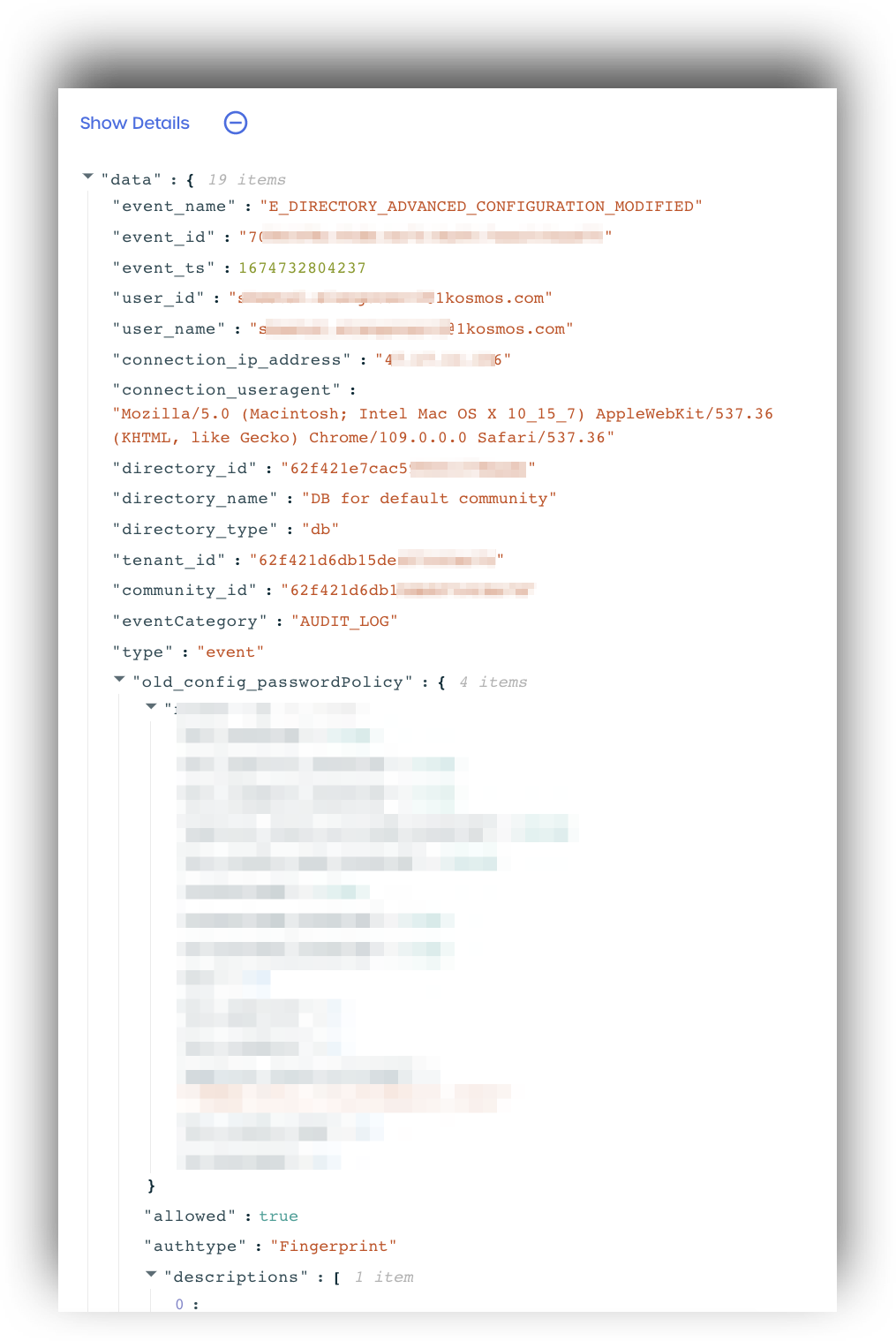
In the individual event details, Administrator activity contains the AUDIT_LOG event category and can be distinguished from user events by looking for this tag.
E_BROKER_DISCONNECTED
The E_BROKER_DISCONNECTED event captures details of a broker experiencing connection issues, or a broker that has been manually disconnected. Details about the user directory linked to the broker and information about when the broker connection was last active
are also recorded.
Event Details Captured
typetenantidcommunityidclient_idauth_module_idlicense_hashsoftware_versiontseventNamebroker_idbroker_namebroker_versionbroker_last_seenreasonconnectedevent_idtimestampepoch_timeevent_nameevent_tsuser_id
E_ROLE_CHANGED
The E_ROLE_CHANGED event is triggered whenever an administrator changes the role of a user within the system. This event is crucial for auditing and tracking role modifications in the system..
Event Details Captured
typeversionserver_ipservice_nameauthorizationtenant_idcommunity_idusernameinitiatedbycaller_user_agentcaller_iprole_changed_fromrole_changed_toevent_idtimestampepoch_timeeventNameevent_nameevent_tsuser_id
E_DIRECTORY_ADDED
The E_DIRECTORY_ADDED event is created when a new directory is added to the tenant. It captures the directory details, including the directory name and type for the following activities:
- When a new AD directory is created using the AD Broker
- When a new LDAP directory is created using the LDAP Broker
- When a new Direct LDAP directory is created
- When a new Azure AD directory is created
Event Details Captured
timestamptenantidcommunityidusernameconnection_ip_addressconnection_useragentdirectory_iddirectory_namedirectory_type
E_DIRECTORY_MODIFIED
The E_DIRECTORY_MODIFIED event is created when any directory settings are modified and contains which specific settings changed.
Event Details Captured
timestamptenantidcommunityidusernameconnection_ip_addressconnection_useragentdirectory_iddirectory_nameold_directory_namenew_directory_nameold_server_protocol_typenew_server_protocol_type
E_DIRECTORY_REMOVED
The E_DIRECTORY_REMOVED event is created when a directory is deleted and contains details about the deleted directory.
Event Details Captured
timestamptenantidcommunityidusernameconnection_ip_addressconnection_useragentdirectory_iddirectory_name
E_DIRECTORY_BROKER_ENABLED
The E_DIRECTORY_BROKER_ENABLED event is created when a user enables an AD or LDAP Broker. It contains directory details, as well as the linked broker name and the time the broker was last detected.
Event Details Captured
timestamptenantidcommunityidusernameconnection_ip_addressconnection_useragentdirectory_iddirectory_namebroker_namebroker_client_idlast_seen_at
E_DIRECTORY_BROKER_DISABLED
The E_DIRECTORY_BROKER_DISABLED event is created when an administrator disables a directory broker and contains information about the directory and broker affected.
Event Details Captured
timestamptenantidcommunityidusernameconnection_ip_addressconnection_useragentdirectory_iddirectory_namebroker_namebroker_client_idlast_seen_at
E_DIRECTORY_BROKER_DELETED
The E_DIRECTORY_BROKER_DELETED event is created when an administrator deletes a directory broker and contains information about the directory and broker affected.
Event Details Captured
timestamptenantidcommunityidusernameconnection_ip_addressconnection_useragentdirectory_iddirectory_namebroker_namebroker_client_idlast_seen_at
E_DIRECTORY_BROKER_MODIFIED
The E_DIRECTORY_BROKER_MODIFIED event is created when an administrator renames a directory broker and contains information about the directory and broker affected.
Event Details Captured
timestamptenantidcommunityidusernameconnection_ip_addressconnection_useragentdirectory_iddirectory_namebroker_namebroker_client_idlast_seen_at
E_DIRECTORY_ATTRIBUTE_ADDED
The E_DIRECTORY_ATTRIBUTE_ADDED event is created when a directory attribute is added to a directory and contains details about the directory and the added directory attribute.
Event Details Captured
timestamptenantidcommunityidusernameconnection_ip_addressconnection_useragentdirectory_iddirectory_nameattribute_namedirectory_attribute_name
E_DIRECTORY_ATTRIBUTE_MODIFIED
The E_DIRECTORY_ATTRIBUTE_MODIFIED event is created when a directory attribute is modified for a directory and contains details about the directory and modified directory attribute. The event details capture the old and new directory attribute names for the modified items.
Event Details Captured
timestamptenantidcommunityidusernameconnection_ip_addressconnection_useragentdirectory_iddirectory_nameold_attribute_namenew_attribute_nameold_directory_attribute_namenew_directory_attribute_name
E_DIRECTORY_ATTRIBUTE_DELETED
The E_DIRECTORY_ATTRIBUTE_DELETED event is created when a directory attribute is deleted for a directory and contains details about the directory and the deleted attribute.
Event Details Captured
timestamptenantidcommunityidusernameconnection_ip_addressconnection_useragentdirectory_iddirectory_nameattribute_namedirectory_attribute_name
E_DIRECTORY_ADVANCED_CONFIGURATION_MODIFIED
The E_DIRECTORY_ADVANCED_CONFIGURATION_MODIFIED is created when an administrator modifies the advanced configuration section of a directory is modified. It records information about the directory, details about which configuration options were modified, and details about the old and new configurations. For example, if the password policy is modified, the log will record the old and new password policies.
Event Details Captured
timestamptenantidcommunityidusernameconnection_ip_addressconnection_useragentdirectory_iddirectory_nameold_login_using_smartcard <boolean>new_login_using_smartcard: <boolean>old_scep_service_urlnew_scep_service_urlold_enrollment_challenge_urlnew_enrollment_challenge_urlold_allow_password_reset: <boolean>new_allow_password_reset: <boolean>old_password_policynew_password_polcyold_kerberos_sso: <boolean>new_kerberos_sso: <boolean>
E_IDP_CONFIGURATION_MODIFIED
The E_IDP_CONFIGURATION_MODIFIED event is created when the IdP configuration is changed on the tenant. The log will capture details about the settings changed, as well as details about the old and new configurations.
Event Details Captured
tenantidcommunityidusernameconnection_ip_addressconnection_useragentold_idp_namenew_idp_nameold_authentication_requestnew_authentication_requestold_key_sizenew_key_sizeold_algorithmnew_algorithmold_service_url_signon_endpointnew_service_url_signon_endpointold_service_url_logout_endpointnew_service_url_logout_endpoint
Reporting Activity
E_REPORT_REQUESTED
The E_REPORT_REQUESTED event is created when an Administrator requests to generate and download report of tenant activity.
Event Details Captured
tenant_idcommunity_idtypeevent_nameevent_tsuser_ideventDatanumber_of_recordsevent_idfilters_usedtenant_dnsuser_idevent_idtimestampepoch_timeeventName
E_REPORT_GENERATED
The E_REPORT_GENERATED event is created when an requested report has been generated and is ready to download.
Event Details Captured
tenant_idcommunity_idtypeevent_nameevent_tsuser_ideventDatanumber_of_recordsevent_idfilter_usedtenant_DNSuser_idevent_idtimestampepoch_timeeventName